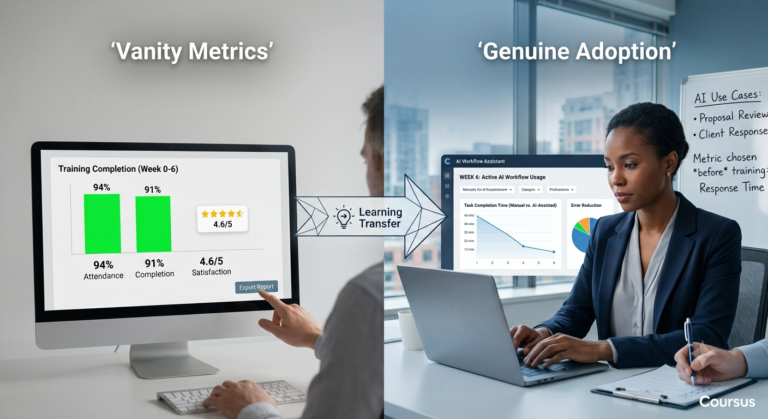


Your employees may be using AI every day. They may be saving hours each week. And yet, a year later, the business may have very little to show for it.
That does not necessarily mean your AI tools are failing.
The problem may be what happens after the AI finishes its part. The faster draft still needs approval. The AI-generated analysis still needs checking. The customer response still gets escalated. The time saved by one employee disappears into a handoff, a review, a correction or another bottleneck elsewhere in the workflow.
This is where an AI productivity audit becomes useful. Instead of asking whether employees are using AI, it follows the time saved from the individual task through the wider workflow to find out how much of that saving actually becomes productive capacity, better output or measurable business value.
The numbers make the shape of the problem clear. McKinsey’s 2026 global survey found that 80% of respondents report improved individual productivity from AI. Yet only 37% report any positive EBIT contribution at the organisational level. In short, individual speed is real, but enterprise performance is a separate question with a separate answer.
Our companion piece looked at this from the top down, asking whether the organisation has changed at all. This article works from the bottom up instead. It follows one saved hour from the moment an employee gains it to the moment it either reaches the business or quietly disappears.
By the end, you’ll know how to tell four things apart: tool usage from effective usage, gross time saved from net time saved, output volume from output quality, and activity metrics from business impact. You’ll also have an AI productivity audit you can run without a consulting engagement.
KEY DISTINCTION The useful executive question is not “how many people use AI?” It is “which important workflows are producing better outcomes because of AI, and by how much against what baseline?”
Usage is not productivity
Three ideas get collapsed into one word. Separating them clears up most of the confusion in an AI steering committee.
| Term | What it means |
|---|---|
| AI usage | A person interacted with an AI tool |
| Useful AI usage | The tool helped complete a suitable task to an acceptable standard |
| Productivity improvement | The organisation produces more valuable output from the same or fewer resources |
The first does not guarantee the second. The second does not guarantee the third. Consider four familiar situations:
- A marketer generates ten campaign variants instead of three. The approval chain still takes nine days.
- A lawyer drafts in half the time. Verifying the citations then takes longer than the drafting did.
- A support agent replies faster. The confident, slightly wrong replies create more escalations.
- A finance analyst summarises reports in minutes. One unchecked error slips into a decision.
In each case, usage is up. Individual effort feels lower. The organisation, though, is no better off. Sometimes it’s worse off. SHRM’s 2026 research makes the same point with data. Among the 41% of US workers who use AI at work, 44% say their own output includes “AI slop,” their term for work that looks finished but is generic, misaligned or wrong. In other words, usage and poor quality coexist comfortably. A usage dashboard cannot tell them apart.
What the firm-level evidence shows
The firm-level evidence points the same way. An NBER working paper surveyed nearly 6,000 senior executives across the US, UK, Germany and Australia. It found that 69% of firms actively use AI, and more than two-thirds of executives use it personally, for an average of just 1.5 hours a week. Even so, nine in ten reported no impact on their own firm’s employment or productivity over the previous three years. Those same executives still expect AI to lift productivity by around 1.4% over the next three years.
Handle that finding carefully in your own reporting. It does not show that AI produces no gains anywhere. It shows that most surveyed executives could not yet detect a firm-level effect, and the data is self-reported rather than measured. The McKinsey, NBER, Workday and SHRM studies also use different populations, definitions and methods. Together they illustrate a consistent pattern. They do not, however, form a single combined estimate.
Read our companion article on diagnosing an AI investment that is not delivering results for the organisational view. Then come back here for the mechanics of a proper AI productivity audit.
The hidden cost of AI-generated work
Every AI-assisted task creates a second, smaller task nobody budgets for: making sure the output is right. When that second task grows large enough, it swallows the first one.
What Workday’s research found
Workday’s 2026 global study, Measuring the Real Value of AI, put a figure on it. Of the employees surveyed, 85% save between one and seven hours a week using AI. Roughly 37% of that saved time, though, is consumed by rework: correcting, clarifying and rewriting low-quality output. Workday’s own framing is worth repeating to a board: for every ten hours of efficiency gained, nearly four go back out the door. Across a year, that adds up to about 1.5 weeks per employee spent fixing AI outputs.
The review burden doesn’t fade with experience, either. Workday found that 77% of frequent AI users review AI-generated work at least as carefully as work from a colleague. Experienced users aren’t checking less. They’ve simply learned what needs checking.
Where the hidden work hides
The hidden work takes predictable forms:
- reviewing outputs that are plausible but unverified;
- correcting factual errors a non-expert wouldn’t catch;
- rewriting generic content into something with a point of view;
- checking citations and figures against sources;
- reconciling AI output with what internal systems actually say;
- resolving whether confidential data was exposed;
- getting approval for AI-assisted work under an unclear policy;
- handling downstream confusion when the recipient doesn’t trust the output.
A crude but practical formula helps executives challenge inflated claims:
Net productivity gain = gross time saved minus review time minus rework time minus coordination cost
This is not a complete accounting model, and it shouldn’t be presented as one. It’s a conversation-opener instead. It forces someone to produce the second and third terms, the ones nobody volunteers.

Worked example. A report that took two hours now takes 30 minutes. Gross saving: 90 minutes. A manager then spends 45 minutes correcting it. Net saving: 45 minutes. The employee spends that 45 minutes on low-value admin instead. Released capacity: zero. Business value realised: zero. Three of those four numbers are invisible in any usage dashboard, which is exactly why an AI productivity audit has to go and find them by hand.
Five places where the expected gains disappear
Leakage point one: AI accelerates one task inside a slow process. If the constraint sits elsewhere, such as legal review, a weekly batch run or a client’s response time, speeding up an upstream task adds nothing except inventory waiting at the bottleneck. This is basic process theory, and AI doesn’t exempt anyone from it.
Leakage point two: AI increases output instead of value. More drafts, more reports, more tickets closed, more proposals sent. Volume rises, and so does the reviewing, filing and deciding that volume creates for everyone downstream. Nobody asked for more content; they asked for better outcomes.
Where the released capacity actually goes
There’s a related trap in what organisations do with the capacity AI frees up. Workday’s research found that companies are more likely to reinvest AI gains in further technology than in developing their people, and some simply raise the expected volume of work instead. That converts a productivity opportunity into a workload increase. So put an uncomfortable question to your own executive team: did AI release capacity for better work, or did it just let us demand more output?
Leakage point three: review absorbs the gain. The draft arrives faster, and the checking burden grows, often shifting to a more senior, more expensive person. The work didn’t shrink; it moved up the org chart.
Why managers matter more than dashboards
Leakage point four: managers never redesign the work. Targets, approval thresholds and performance conversations all stay as they were, so people default back to the old workflow. Gallup’s 2026 survey of US workers in AI-implemented organisations found that only 12% strongly agree AI has transformed how work gets done. Employees whose managers actively support AI use, though, were 8.7 times more likely to say their work had changed. Fewer than one in three strongly agreed their manager actually does so.
Leakage point five: the organisation measures activity. Prompt volume, active users and licence utilisation all look healthy while quality, cycle time and cost per case sit untouched. The reporting system, as a result, is structurally incapable of noticing the problem, so the problem persists.
AMBER — THE PATTERN TO WATCH Four of these five leakage points are organisational, not technical. Buying a better model fixes none of them. That can lead to an expensive misdiagnosis: treating a workflow and capability problem as a model-selection problem. An AI productivity audit exists precisely to catch that mistake before the next renewal.
Useful usage versus unproductive usage
Not all use is equal, and the differences are large enough to classify formally. Use this table in a steering committee, and ask each function to place its own use honestly.
| Usage type | Description | Likely value |
|---|---|---|
| Decorative | AI used because it’s available and expected | Low |
| Isolated | AI improves one small task inside an unchanged process | Low to moderate |
| Assisted workflow | AI supports several connected steps with defined review | Moderate |
| Redesigned workflow | The process and roles were rebuilt around what AI can do | High |
| Strategic | AI improves a capability the business competes on | Potentially very high |
Many organisations risk treating activity in the first two rows as evidence that they’ve reached the fourth.
Genuinely useful usage shares five traits, and together they make a serviceable screening test for any proposed AI use case:
- It addresses a recurring task, not a one-off. Recurrence is what turns a time saving into capacity.
- The task has a clear baseline. If nobody knows how long it took before, no improvement can be shown afterwards.
- Quality can be checked against something: a source document, a system of record, a standard, an expert.
- The workflow has a named owner who can authorise changing it and is accountable for the result.
- The result connects to a business outcome that someone outside the team already cares about.
A use case that fails three or more of these isn’t necessarily a bad idea. It’s a bad first idea. Score your own use cases against this list before you run a full AI productivity audit. It tells you where to point the audit first.
What to measure instead of prompts and logins
Replace the usage dashboard with a balanced set spanning speed, quality, capacity, customer, financial, risk and people.
| Dimension | Example metrics |
|---|---|
| Speed | Cycle time, response time, time to completion |
| Quality | Error rate, rework rate, first-pass acceptance |
| Capacity | Cases handled, decisions completed, backlog absorbed |
| Customer | Satisfaction, first-contact resolution, retention |
| Financial | Cost per transaction, margin, revenue contribution |
| Risk | Compliance exceptions, security incidents, escalation rate |
| People | Confidence, role clarity, workload, skill development |
Why measurement discipline predicts performance
There’s good evidence that measurement discipline is itself a performance variable, not administrative overhead. KPMG’s 2026 global AI in finance research, based on 1,013 senior finance leaders across 20 countries, found the strongest reported improvements clustering in judgement-heavy work: decision quality, decision speed and forecast accuracy. More usefully for an AI productivity audit, it also found that only 29% of organisations track where their AI initiatives are actually failing, while 42% describe themselves as fully assurance-ready. Assurance-ready organisations reported far higher rates of error reduction, 33% against 6%, and far greater confidence in scaling AI further. In short, being able to see where AI fails predicts performance better than simply tracking that AI is being used.
Two cautions before you build the scorecard. First, KPMG’s finance sample isn’t your organisation, and cross-survey comparisons are unsafe: McKinsey, Workday, SHRM, Gallup, Bain and KPMG use different populations, definitions and outcome measures. Use them to understand the pattern, then measure your own baseline. Second, resist breadth. Select:
- one primary business outcome;
- two supporting operational measures;
- one quality or risk guardrail;
- one people measure, wherever the workflow changes what employees are accountable for.
Five metrics with named owners beat twenty-five metrics with none.
How to redesign the workflow so the saving survives
Bain’s 2026 research is direct about sequence: pay down workflow debt before deploying AI, the same way you’d pay down technical debt. Workflow debt is the unnecessary work that builds up around meetings, approvals, policies and handoffs over years. Automating a process carrying that debt doesn’t remove it. It embeds the debt, speeds it up, and makes it more expensive to unpick later.
The first half of the method: see the problem clearly
- Select a high-volume, high-friction workflow with an owner who can change it.
- Measure its current performance: cycle time, rework rate, volume, cost, failure points.
- Remove unnecessary steps before adding any AI. Ask what the process would look like designed from scratch today, then build to that, not to the current version.
- Identify where AI can assist, automate, or recommend, and be specific about which of the three.
- Define human review and escalation explicitly: who checks what, against what, and when they stop.
The second half: make the change stick
- Redesign roles so responsibility for the output is unambiguous. Workday’s research found that in 89% of organisations, fewer than half of roles had been updated to reflect AI capabilities. Their own shorthand, 2025 tools running inside 2015 job structures, is useful for executives, though it’s a research narrative rather than an established category, so attribute it rather than treat it as a term of art.
- Train people on the actual workflow, not the tool in the abstract. There’s a striking access gap here: Workday found that 66% of leaders name skills training as a priority, while only 37% of the employees experiencing the most rework report having access to it. This is where a role-specific AI capability programme does something a generic awareness course can’t. It teaches a finance analyst which reconciliation steps are safe to delegate and what sufficient verification actually looks like.
- Pilot against a baseline period or a comparison group.
- Review the outcome honestly, including the failures and the new work the change created.
- Scale only if the outcome improved without unacceptable risk. Otherwise, redesign or stop.
None of this is exotic. It’s exactly what a proper AI productivity audit should surface, step by step, on one workflow before you touch a second one.
The AI productivity audit: a practical method you can run this quarter
8 questions. 8 evidence checks. One workflow. Run it before buying another licence.
| Question | Evidence to collect | Warning sign |
|---|---|---|
| What outcome was promised? | Business case and pre-deployment baseline | The case names a tool deployment, not an outcome |
| Which workflow changed? | Process map plus direct observation | People use AI outside the documented process |
| What is the net time saving? | Time study plus rework data | Only gross savings have ever been reported |
| Is quality improving? | Error rates, first-pass acceptance, escalations | Output volume rose, and so did corrections |
| Who owns the result? | Named executive or process owner | IT owns the tool; nobody owns the outcome |
| Is training role-specific? | Curriculum mapped to tasks and assessments | Everyone completed identical awareness training |
| Are managers reinforcing the change? | Team routines, targets, one-to-one agendas | Old performance metrics are still in force |
| Are metrics outcome-based? | Dashboard and reporting cadence | Prompts and logins dominate the executive pack |
Run this AI productivity audit against one workflow, not the whole organisation. A single well-evidenced answer beats a company-wide survey, and it takes about three weeks.
TURN USAGE INTO CAPABILITY Coursus Corporate AI Training builds role-specific AI capability around the workflows your teams actually run, with verification standards and measurable outcomes designed into the programme. Explore the programme to see the curriculum and current intake.
Frequently asked questions
What is an AI productivity audit?
An AI productivity audit is a short, evidence-based review of one workflow: what outcome AI was meant to improve, what actually changed, what net time was saved once rework is subtracted, and what the organisation should measure next. It replaces a guess about whether AI is “working” with a specific answer for one process, typically inside two to three weeks.
Why are my employees using AI without becoming more productive?
Because individual time savings and organisational productivity are different quantities. The gap between them is filled by review, rework, approvals and unchanged handoffs. Workday’s 2026 research found that while 85% of employees save one to seven hours a week using AI, roughly 37% of that time goes back into correcting and rewriting low-quality output, and only 14% report consistently net-positive outcomes. If the surrounding workflow, roles and targets stay unchanged, whatever survives rework tends to get absorbed by existing work rather than redirected to anything more valuable.
What is the difference between AI usage and AI productivity?
AI usage means somebody interacted with a tool. AI productivity means the organisation produced more valuable output from the same or fewer resources. Between them sits useful usage: the tool helped complete a suitable task to an acceptable standard. An organisation can have very high usage, mediocre useful usage and zero productivity improvement at the same time. Usage is measured in logins and prompts; productivity is measured in cycle time, quality, cost and customer outcomes against a baseline.
How do you measure whether AI actually improves productivity?
Establish a baseline for one workflow before you change anything. Then measure the same things afterwards: cycle time, rework rate, first-pass acceptance, volume handled and cost per case. Compare against a control period or a comparison group so you can separate the AI effect from seasonality. Track net time saved rather than gross, subtracting review, correction and coordination. Assign a named owner to every metric, and keep the set small: one business outcome, two operational measures, one quality guardrail and one people measure is enough. That, in practice, is what an AI productivity audit does for you.
Can AI save time without creating any business value?
Yes, this is the normal case, not the exception. Time saved becomes business value only if the saving survives review and rework, the released capacity gets redirected to something that matters, and the surrounding process can absorb the faster input without creating a new queue. If a report is produced in a quarter of the time but still waits nine days for approval, nothing changed for the customer or the accounts. Saved time is a raw material, not a result.
What should companies measure instead of AI prompts and logins?
Measure across seven dimensions and pick sparingly within them: speed, quality, capacity, customer outcome, financial result, risk and people. KPMG’s 2026 research found that organisations able to see where their AI initiatives are failing, a group that’s currently only 29%, report far higher rates of error reduction and far greater confidence in scaling. Retire usage metrics from executive reporting once a rollout is past its first quarter; they answer a question you’ve already answered.
How can Nigerian and African businesses measure AI productivity when data and infrastructure are uneven?
Choose workflows where the data you need is already bounded and accessible, and measure those properly rather than attempting an enterprise-wide programme on inconsistent foundations. Manual time studies and simple before-and-after comparisons on a single process are valid evidence and need no data warehouse. The IMF’s 2026 analysis of AI in Sub-Saharan Africa estimates regional productivity gains of about 0.2% over a decade under current conditions. That figure rises to roughly 2.1% only under a separate, higher-adoption scenario where electricity, connectivity, skills and governance gaps are substantially closed. These are two different futures, not a guaranteed range. Budget for power and connectivity resilience explicitly, and invest in role-specific capability, which is the one variable an individual organisation fully controls.
THE GAP IS CAPABILITY AND WORKFLOW, NOT TOOLING AI tools don’t improve productivity simply because people use them. Productivity improves when AI is applied to the right work, inside a redesigned workflow, by people capable of verifying and improving what it produces. Running an AI productivity audit is how you find out which of those is missing. Coursus Corporate AI Training builds role-specific AI capability around the workflows your teams actually run, with verification standards and measurable outcomes designed into the programme. Explore Coursus Corporate AI Training to see the curriculum and current intake.